Download Shizuku APK v13.6.0 for Android, Official, Safe & Verified (2026)
Shizuku APK is the free, open-source Android manager app that lets ordinary apps use system APIs with ADB privileges, without root. The official stable build is v13.6.0 (r1086), released 25 May 2025 by Xingchen & Rikka (RikkaApps), and it needs Android 7.0 or newer.
Here's the thing, Shizuku does nothing on its own. It's a bridge, not a debloater, not a file manager, not a root app. What it does is start one privileged server on your phone, and then apps you approve, Canta, Hail, App Ops, Swift Backup, aShell, can call system services through that server. And that's why people search for it: debloat without root, freeze apps, back up without a PC, open Android/data, run ADB commands from the phone itself.
But there's a catch in late 2026. The official build is stalled, Android 17 broke it, and two competitors list the wrong beta build as "latest". So which Shizuku should you install? That depends on your Android version, and this page answers it first, before the download link.
Quick Answer
Shizuku APK v13.6.0 (r1086, 25 May 2025) is the only official RikkaApps stable build for Android 7.0+. It gives approved apps ADB-level access (shell UID 2000) without root, via wireless debugging or a PC. On Android 17, use the community fork Shizuku-Next or thedjchi 13.7.0 instead, because official 13.6.0 shows no authorised apps there. Download only from the official GitHub releases page and check the SHA-256 first.
Download Shizuku APK v13.6.0 (r1086), Verified File Details
Download Shizuku APK from the official GitHub releases page for RikkaApps/Shizuku, that is the only download link on this page. Searching for Shizuku GitHub leads to the same place: the RikkaApps/Shizuku repository, where every release, changelog and source file lives. We do not host the APK file here, and we do not link to a random mirror. Why does that matter? Because a repacked APK with the same name can carry anything, and the only way to know you have the real build is the hash and the signer.
The file is shizuku-v13.6.0.r1086.2650830c-release.apk, 2,571,773 bytes (2.45 MB). The package name is exactly moe.shizuku.privileged.api, the developer is Xingchen & Rikka, and the licence is Apache-2.0. It needs Android 7.0 (API 24) or newer, and it targets Android 16 (API 36). What most people miss is the version trap: 13.6.0.r1091 is a beta build from July 2025, not stable, and 13.8.20 does not exist as an official version at all.

SHA-256 & signature, how to verify before you install
Check the file SHA-256 against the value reported for the official release. The signer SHA-256 is published below it. Use sha256sum on Linux or Mac, or certutil -hashfile on Windows, and compare the full string, not the first few characters. If the hash differs, don't install it.
6e273ab0e991c4e79bc8b1bbb9b9dd739ccac1a8712a541a214078886b7b790f268b5590e868fb08bae7e0ac413564cd1ff88f5ccff74af9dbd0dc918e30db30File details: size, package, Android 7+
| Detail | Value |
|---|---|
| Version | 13.6.0 (13.6.0.r1086.2650830c) |
| Release date | 25 May 2025 |
| File size | 2.45 MB (2,571,773 bytes) |
| Package name | moe.shizuku.privileged.api |
| Developer | Xingchen & Rikka (RikkaApps) |
| Licence | Apache-2.0 |
| Minimum Android | 7.0 (API 24) |
| Target Android | 16 (API 36) |
| Play Store rating | 4.23 stars from 60,030 ratings (AppBrain, 23 Nov 2026) |
| Installs | 10,000,000+ band; AppBrain cumulative estimate 46 million |
Download from GitHub / Google Play / F-Droid, which source to use
GitHub is the source used on this site, because RikkaApps publishes releases there first and the raw APK comes with a verifiable hash. Shizuku GitHub is the canonical source here, the repository is where the official build, the release notes and the source code all live, so a link there always points to the real file. F-Droid (IzzyOnDroid) is also listed on the official download page. A Google Play link is not included on this site, by the site owner's order, the Play listing was stuck on 13.5.4 from March 2024 until 4 September 2026, when it finally updated to the same 13.6.0, and Play still has no Android 17 fix. So GitHub is the canonical source here.
The real Shizuku app, in four original screenshots, same phone size on every frame, full screen visible, status bar and bottom buttons included. No redrawn mockups.
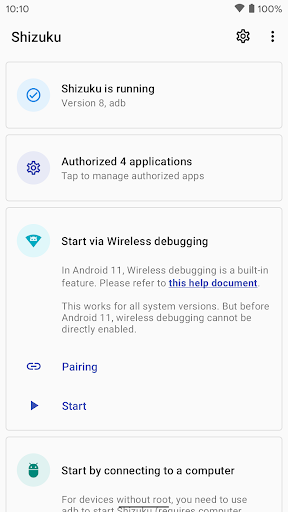
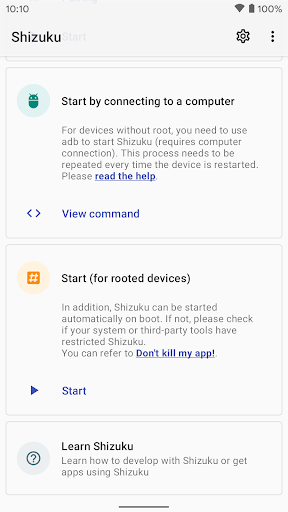
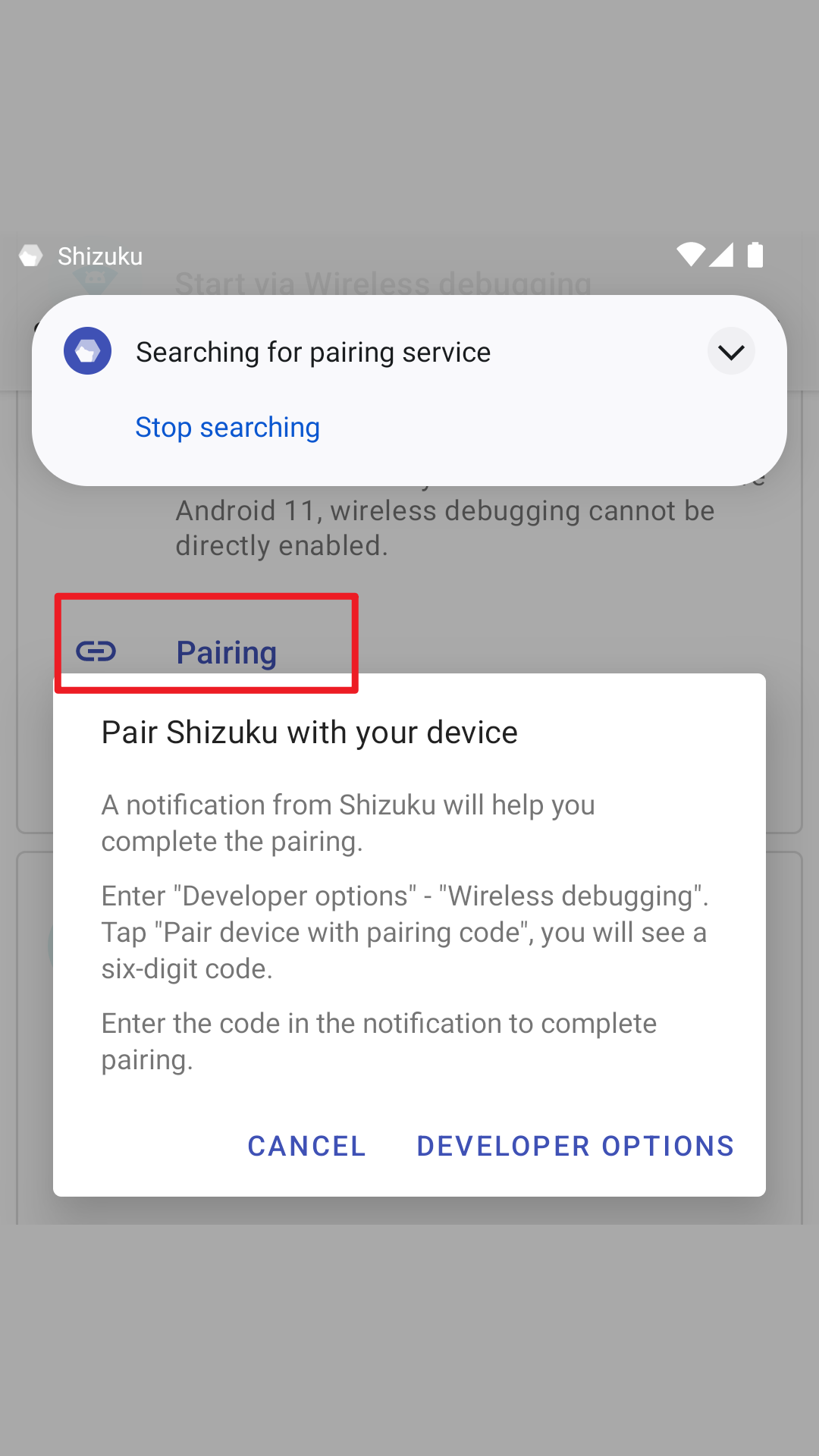
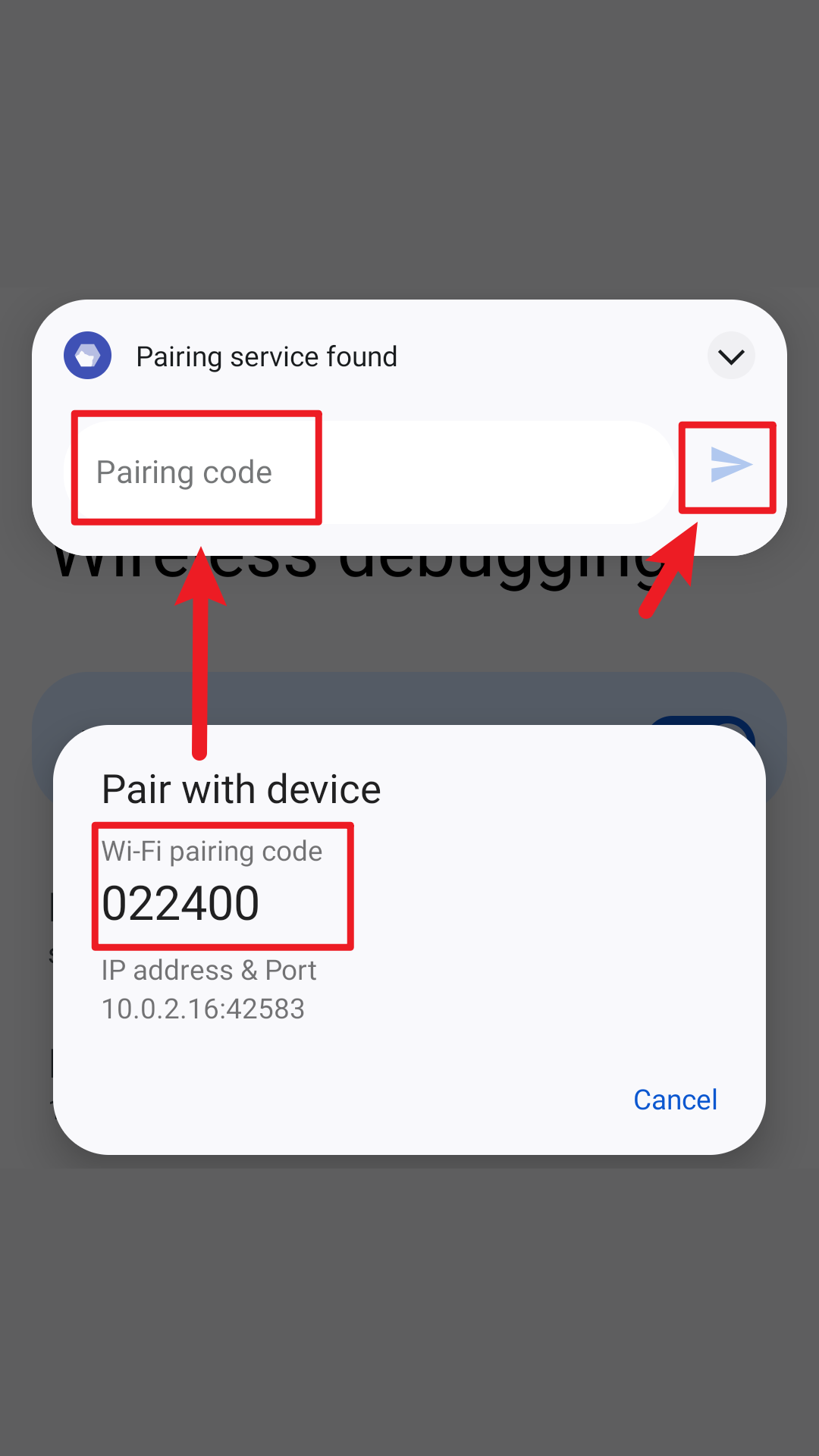
Original screenshots by Xingchen & Rikka, from the official Google Play listing of Shizuku and the official Shizuku user guide (shizuku.rikka.app).
What Is Shizuku? (No Root, ADB-Level Access)
Shizuku is a free, open-source Android manager app plus a privileged server. Normal apps are sandboxed, they can only touch their own data, and each sensitive action needs a permission dialog. Root (UID 0) breaks that sandbox completely, but it needs an unlocked bootloader and can trip Play Integrity and banking apps.
ADB, or shell (UID 2000), sits in the middle. It's the identity a PC gets over adb shell, and it's far broader than a normal app: package management, secure settings, logcat, screen capture. But it's capped well below root, and it needs no bootloader unlock and no system change. Shizuku lends that shell identity to apps you approve. It starts one Java process with app_process, hands its Binder to each app at start-up, and those apps then call system services as the server, not as themselves.
It can't read other apps' private data, do root-only jobs, help apps without Shizuku support, or bypass SELinux and OEM limits, and it stops after a reboot unless you use root, trusted Wi-Fi auto-start, or a fork with a watchdog.

You start the server
One tap with wireless debugging on Android 11+, one ADB command from a PC, or instantly if your phone is already rooted.
Apps ask permission
Each app requests access once. You approve it inside Shizuku, nothing gets system power silently.
System APIs, directly
Approved apps call real system APIs through the Shizuku Binder, fast and stable, until you reboot.
What's New in Shizuku v13.6.0, Android 16 QPR1 & Trusted Wi-Fi Auto-Start
Version 13.6.0 (25 May 2025) is the last official release: Android 16 QPR1 support, auto-start without root on Android 13+ on a trusted Wi-Fi network, and an updated start command, the old start.sh command was removed, so copy the new command from "View command" in the app. No official release has followed since May 2025, which is why the forks matter for Android 17.
Trusted Wi-Fi auto-start, step by step: Shizuku trusted Wi-Fi auto-start. Latest-version tracker: updates.
Shizuku on Android 17, Official 13.6.0 vs Shizuku-Next & thedjchi 13.7.0
If you're on Android 17, the version choice matters more than the download itself: official Shizuku APK 13.6.0 is broken there, it shows an empty authorised-apps list (GitHub issue #2180, open since June 2026). Use a community fork instead. Full guide, per-fork setup and signing-key warning: Shizuku on Android 17.
| Build | Version / date | Android | Best for |
|---|---|---|---|
| Official Shizuku APK | 13.6.0 (r1086), 25 May 2025 | 7.0-16 | Android 16 and below, most stable |
| thedjchi fork | 13.7.0, 2 Jul 2026 | 7-17 | Android 17, MediaTek phones, stable fork (maintenance paused) |
| Shizuku-Next | 14.0.38-next, seen 23 Nov 2026 | 7-17 | Android 17, newest features, auto-pairing |
| Shizuku+ | 13.7.0.r3349, 18 Nov 2026 | 7-17 | Side-by-side install (single secondary source, verify first) |
How to Set Up Shizuku Without Root, Wireless Debugging (Android 11+)
You don't need a PC or root to start Shizuku APK, wireless debugging on Android 11+ is the normal way, and it takes about three minutes when the pairing code behaves.
Enable & pair
Enable Developer Options and Wireless debugging on your phone.
Enter the code
Pair with the fresh 6-digit code from the Shizuku notification.
Start & approve
Tap Start, then approve your first app inside Shizuku.
Full step-by-step with screenshots and the exact taps: Shizuku wireless debugging guide. If pairing fails, see Shizuku pairing code not working. Official guide: shizuku.rikka.app/guide/setup.
How to Start Shizuku with a PC (ADB), Windows, Mac & Linux
A PC is the only non-root way to start Shizuku on Android 10 and below, and the fallback when wireless debugging won't pair. Install Platform Tools, run adb devices, then copy the start command from "View command" in the app itself, the old start.sh command was removed in 13.6.0, so don't paste it from a 2024 guide. Full PC guide: Shizuku setup guide (ADB method).
How to Start Shizuku with Root (Magisk / KernelSU / Sui)
If your phone is already rooted, starting Shizuku is one tap ("Start via Root") and the server runs as UID 0, higher access, higher risk, and it can trip Play Integrity. Sui is a separate RikkaApps Magisk module that gives the same API as root with no manager app. Don't root a phone just to run it, wireless debugging covers most uses. Full comparison: Shizuku vs root.
Shizuku Not Working? Troubleshooting & Fixes
It stops, fails to pair, or shows an empty app list more often than any other Android tool, and the fix is almost always a setting, not a reinstall. Work through the error you actually see. Full symptom cause fix diagnostic table: Shizuku not working.
| Error you see | Likely cause | First fix |
|---|---|---|
| Pairing code not working / pairing failed | Code expired, notification permission off | Fresh code, enter it at once, pairing code fixes |
| Stuck on "Searching for pairing service" | Background / VPN / Smart Switch state | Unrestricted battery, VPN off, forget device and re-pair |
| Stops after screen off or reboot | Normal in ADB mode | Restart it, or use trusted Wi-Fi auto-start / a fork watchdog, auto-start guide |
| "Please go through the pairing step first" | Not paired yet | Pair with a fresh 6-digit code, then tap Start |
| Not working on MediaTek phones | Bug #1198 in official 13.6.0 | Use thedjchi 13.7.0 or Shizuku-Next, MediaTek fix |
| Not working on Android 17 (no authorised apps) | Issue #2180, official build broken | Install a fork, Android 17 guide |
Shizuku on Samsung (One UI), Xiaomi HyperOS / MIUI, OnePlus & OPPO, Device Guides
Shizuku APK works the same way everywhere, but each brand hides a switch that breaks it. Samsung (One UI): turn off Auto Blocker first, and re-pair after a Smart Switch transfer, full guide: Shizuku on Samsung. Xiaomi / Redmi / POCO (HyperOS / MIUI): sign in to a Xiaomi account with a SIM before "USB debugging (Security settings)" appears, and set Autostart + No restrictions, full guide: Shizuku on Xiaomi HyperOS. OnePlus / OPPO (ColorOS): turn off "Permission monitoring" in Developer Options before pairing, covered in Shizuku not working.
Best Apps That Work With Shizuku (Compatible Apps Directory)
Shizuku APK does nothing on its own, the apps do the magic. Start with Canta to debloat, Hail to freeze, aShell You for an on-device ADB shell, and App Ops for privacy control. Freeze first, uninstall later, that's the safe order. Each app must add Shizuku support itself, and you approve each one separately. Full searchable directory: Best Shizuku apps, including Canta, Hail and aShell You.
Canta
Uninstall user and selected system apps for the current user, without root, and restore them later from its Uninstalled tab.
Hail
Freeze, hide or disable apps, and freeze whole groups with one tap. Frozen apps defrost instantly. Open source (GPL-3.0).
aShell You
A local ADB shell that connects to Shizuku directly, run ADB commands from the phone itself, no PC, no cable.
App Ops
RikkaApps' own app for fine-grained per-app permission and AppOps control without root, including permissions Settings never shows.
Swift Backup
Back up and restore apps, media and data without root; with Shizuku it can also back up external files under Android/data and obb.
SD Maid SE
Thorough leftover-file cleaning, plus InstallerX Revived for split APKs and ZArchiver for Android/data access, more in the full directory.
Shizuku vs Root, Which Is Better?
Shizuku APK in ADB mode is not root: root is UID 0, ADB mode is shell UID 2000, broader than a normal app, but capped below root. Root needs an unlocked bootloader and can trip Play Integrity and banking apps; Shizuku needs none of that and is fully reversible. If you only need debloat, freeze, backup and ADB commands, it wins. If you need root-only jobs, only root does them. Full table and verdict: Shizuku vs root.
Shizuku vs Dhizuku vs Sui (Comparison Table)
Dhizuku is a device-owner app (survives reboot, needs a fresh device to set up); Sui is a Magisk module (same API as root, needs Magisk). Most users should start with Shizuku. Full comparison: Shizuku vs Dhizuku vs Sui.
| Feature | Shizuku | Dhizuku | Sui |
|---|---|---|---|
| Privilege | ADB shell (UID 2000) or root (UID 0) | Device owner | Root (UID 0) |
| Needs root? | No (ADB mode) | No | Yes, Magisk |
| Survives reboot? | No, unless root / trusted Wi-Fi / fork watchdog | Yes | Yes |
| Best for | Most users, debloat, freeze, backup | Persistence without root, fresh phone | Rooted users, developers |
Is Shizuku Safe? Permissions, Risks & What NOT to Authorise
In ADB mode, Shizuku APK is open source (Apache-2.0), makes no system change, needs no bootloader unlock, and stops when you stop it. The risk is which apps you authorise, there is no allowlist, so an approved app can do anything the shell can do. Approve only apps you trust, and always verify the APK hash and signer first. Full safety guide, fake/mod APK warning and what never to authorise: Is Shizuku safe?
Shizuku Old Versions, Download Previous APKs (13.5.4, 13.5.3...)
Sometimes the newest build isn't the right one, on MediaTek phones some users report 13.5.4 works where official 13.6.0 fails. Use an old version only for a named reason (MediaTek bug, a specific regression, or an old Android version). Full archive with per-version Android targets and the "when to downgrade" decision guide: Shizuku old versions.
| Version | Date | Android | When to use it |
|---|---|---|---|
| 13.6.0 (r1086) | 25 May 2025 | 7.0-16 | Current official stable, default choice |
| 13.5.4 | 10 Mar 2024 | 7.0+ | MediaTek phones where 13.6.0 fails |
| 13.5.3 (r1036) | Dec 2023 | 7.0+ | Older devices, rollback only |
Download old versions only from the official GitHub releases page. Remember: 13.6.0.r1091 is a beta, not a newer stable.
Frequently Asked Questions About Shizuku
What is Shizuku APK?+
Shizuku APK is a free, open-source Android manager app by Xingchen & Rikka that lets approved apps call system APIs with ADB privileges (shell UID 2000) without root. It does nothing on its own, it is a bridge. Apps like Canta, Hail and App Ops use it to debloat, freeze, back up and manage permissions.
Is Shizuku APK safe?+
In ADB mode, the app is open source, makes no system change, needs no bootloader unlock, and stops when you stop it. The risk is not the app itself, it is which apps you authorise, because an approved app can do anything the shell can do. So approve only apps you trust, and verify the APK hash before installing.
Do I need root to use Shizuku APK?+
No. It works without root on Android 11+ using wireless debugging, and on Android 7.0+ with a PC over ADB. Root is only one start method, if you are already rooted, you can start it with root, but don't root a phone just to run it, because wireless debugging covers most uses.
How do I start Shizuku without a PC?+
Enable Developer Options and Wireless debugging, tap Pairing in the app, then tap "Pair device with pairing code" in Wireless debugging and enter the 6-digit code from the notification. Tap Start, then approve your first app. The whole setup takes about three minutes when the code is fresh.
Which version should I install, official 13.6.0, thedjchi 13.7.0, or Shizuku-Next?+
Use the official 13.6.0 build on Android 16 and below. Use Shizuku-Next or thedjchi 13.7.0 on Android 17, because official 13.6.0 shows no authorised apps there. Use a fork on MediaTek phones too, because official 13.6.0 has a MediaTek bug. Uninstall the official build first, forks use a different signing key.
Why does Shizuku stop working after every reboot?+
It stops after reboot by design in ADB mode, because the privileged server is not started automatically. Open the app and tap Start again. For a lasting fix, use Android 13+ trusted Wi-Fi auto-start, root mode, or a fork with a watchdog, thedjchi 13.7.0 and Shizuku-Next both restart the server if it is killed.
Why is Shizuku not working on Android 17?+
The official 13.6.0 build is broken on Android 17, it shows no authorised apps and new authorisations fail. This is GitHub issue #2180, open since June 2026 with no developer reply. The cause is a hidden API change plus Local Network Protection blocking pairing. Only the forks fix it, so install Shizuku-Next or thedjchi 13.7.0 instead.
Does Shizuku work on Android 14, 15 and 16?+
Yes. The official 13.6.0 build supports Android 14, 15 and 16, including Android 16 QPR1, and it needs Android 7.0 or newer. Android 17 is the break point, official 13.6.0 does not work there, and you need a fork. Android 14 and 15 users should install the official GitHub 13.6.0 build, not the old Play Store 13.5.4 build.
How do I debloat with Shizuku and Canta, and can I restore apps?+
Install the app, start it, then open Canta and approve the prompt. Canta lists system apps with safety labels, remove Recommended apps, research Advanced ones, and leave Unsafe ones alone. Yes, you can restore apps later from Canta's Uninstalled tab, and a factory reset restores everything. Never remove Phone, Settings, SystemUI or Play Services.
Where is the safe place to download Shizuku APK, and how do I check it is real?+
Download Shizuku APK only from the official GitHub releases page for RikkaApps/Shizuku, that is the only download link on this site. Check three things: the package name is exactly moe.shizuku.privileged.api, the file SHA-256 matches 6e273ab0e991c4e79bc8b1bbb9b9dd739ccac1a8712a541a214078886b7b790f, and the signer matches RikkaApps. If any of them differ, don't install it.
Video Guide: How to Install & Start Shizuku in 5 Minutes
The Only Way To Setup Shizuku On Android 16, OnZan
Watch the pairing code appear and the Start button turn green, the verified Android 16 setup walkthrough by OnZan (182K views, verified 23 Nov 2026) shows the exact wireless-debugging flow. On Android 17, watch the fork setup instead. Full video + step-by-step transcript: Shizuku video guide.
On Android 17? Pick your fork in the comparison table above, then download from GitHub. Stuck on pairing? Jump to the troubleshooting fixes, most errors are one setting.
Download from GitHub Releases Free - Open Source (Apache-2.0) - No account needed - This site does not host the APK file